Apprentice Workshop resume template: how to use it, tips & FAQ
Who this template is for: Apprentice Workshop is for apprentices and trainees, not ticketed tradespeople. Default paper: A4. Section order: Profile → Training and tickets → Workshop projects → Placements → Tools. Use it when you want a clean single-column reading flow with crisp modern sans-serif typography.
Use Apprentice Workshop — freeAll 88 templates

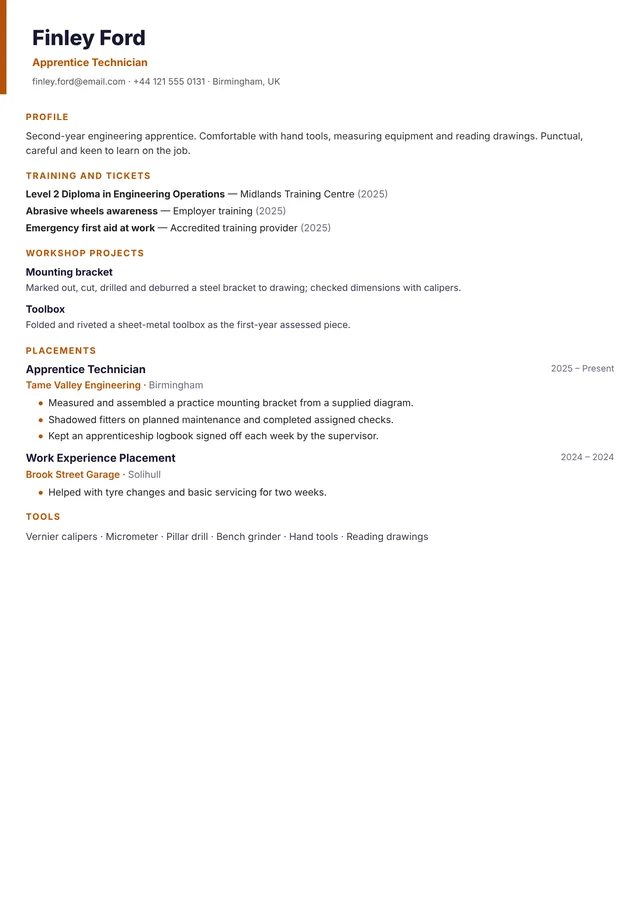
Preview with fictional sample content, drawn by the same renderer as the builder.
When to use another design: Write hours only if you recorded them. Do not print a certificate number.
What the Apprentice Workshop layout looks like
Apprentice Workshop runs in this order: Profile → Training and tickets → Workshop projects → Placements → Tools. Training and tickets goes first because it shows which year of the apprenticeship you are in. Workshop projects is the heart of the page: one assessed piece per entry with the operations you used. Tools is a plain list of equipment you have used under supervision. It is a single column, so the downloaded file reads in the same order you see on screen. The page is set up for A4 paper and has no photo slot.
From a visual hierarchy standpoint, Apprentice Workshop pairs clean sans-serif headings that scan fast on laptop and mobile screens with a full-width single-column body that gives every bullet point room to breathe without awkward line wraps.
Apprentice Workshop has no photo slot, which suits the US, Canada, the UK, Ireland and Australia. For a country that expects a photo, Berlin or Diplomat fit better.
Is Apprentice Workshop ATS-friendly?
This page does not promise that software will rank you. For a career portal, download Text PDF or Word so the reading order is linear. Use Design PDF when you email a person and want the colour.
For an online portal, export the Text PDF or Word file; you can check the result first in the ATS checker.
Worked example written for this layout
In Apprentice Workshop the “Workshop projects” block carries the proof, so a vague line there costs you the most. The sample below is a fictional engineering apprentice. Copy the shape of the sentence. Do not copy the numbers unless they are true of your own work.
- Before (vague duty): “Learned how to use tools and helped in the workshop.”
- After (action, scope and a result you could explain in an interview): “Marked out, cut, drilled and deburred a steel mounting bracket to drawing, and checked every dimension with vernier calipers to within 0.5 mm.”
The piece, the operations and the tolerance. An assessor reads this as proof you can follow a drawing. The full method — verb, scope, tool, result, and what to do when you have no percentage — is in how to write a resume bullet.
Two mistakes people make with Apprentice Workshop
- Four-line paragraphs under each job. Apprentice Workshop gives every line the full page width, which makes long paragraphs look heavier, not richer. Three to five one-line bullets per role read better.
- Expecting a photo slot. Apprentice Workshop has none on purpose. If your target country expects a photo, pick a template with one rather than pasting an image into the text.
Tips for a stronger Apprentice Workshop resume
- List hours or competence only if recorded; protect certificate IDs.
- Edit in this order: Profile → Training and tickets → Workshop projects → Placements → Tools.
- Example you can study, then replace: Measured and assembled a practice mounting bracket from a supplied diagram.
- Write hours only if you recorded them. Do not print a certificate number.
Start with Apprentice Workshop
Open Apprentice Workshop in the builder, choose the country you are applying to, and type over the sample. Every button is explained in how to use the resume builder.
Apprentice Workshop template FAQ
Who is Apprentice Workshop for?
Apprentice Workshop is for apprentices and trainees, not ticketed tradespeople. Default paper: A4. Section order: Profile → Training and tickets → Workshop projects → Placements → Tools.
Should I upload the coloured PDF to a portal?
No. Upload Text PDF or Word. Keep the coloured Design PDF for a person who will open the file.
What should the first lines show?
List hours or competence only if recorded; protect certificate IDs. A fictional line to study: “Measured and assembled a practice mounting bracket from a supplied diagram.” Replace it with work you can explain in an interview.
How is it different from the older templates?
UK Trade Tickets is for workers; this prioritizes supervised training. Layout: single column, amber training ledger.
Is the Apprentice Workshop template completely free?
Yes. Apprentice Workshop is free to edit in your browser and download as a Text PDF, Design PDF or Word (.docx) file, with no sign-up and no watermark.
Which Apprentice Workshop download should I send to an online application portal?
Use the Text PDF or Word file. Apprentice Workshop is already a single column, so both exports keep the same order you see on screen.
Compare similar templates
UK Trade Tickets is for UK site trades where tickets decide the shortlist. Default paper: A4. Section order: Profile → Current tickets → Site experience → Equipment → Training.
Students, fresh graduates, interns and campus-placement applications where education and projects are the strongest part of the page.