Oasis CV template: how to use it, tips & FAQ
Who this template is for: Applications to the UAE, Saudi Arabia, Qatar, Oman, Kuwait and Bahrain, and to recruitment agencies that ask for nationality and visa status up front. Use it when you want a clean single-column reading flow with crisp modern sans-serif typography.
Use Oasis — freeAll 88 templates

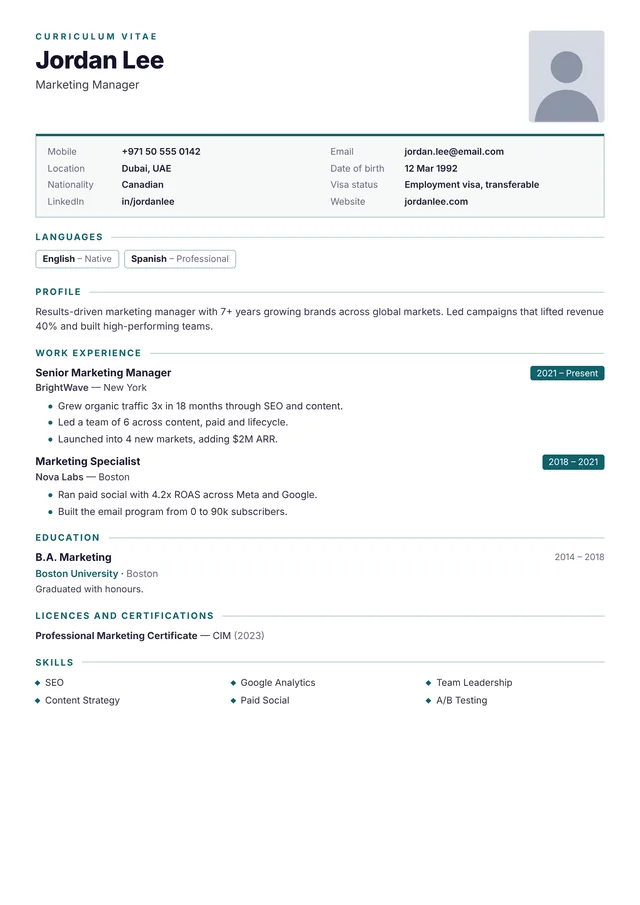
Preview with fictional sample content, drawn by the same renderer as the builder.
When to use another design: US, UK, Canadian and Australian applications. The page still works there because the personal rows and photo disappear, but a plainer single column such as Meridian is the safer pick.
What the Oasis layout looks like
A small “Curriculum Vitae” label sits above your name and title, with an optional passport-style photo on the right. Directly underneath, a bordered two-column grid lists mobile, email, location and — when the country format allows them — date of birth, nationality, marital status and visa status. Languages follow as outlined tags, then profile, work experience with the dates in a solid label, education, licences and certifications, and skills in three columns.
From a visual hierarchy standpoint, Oasis pairs clean sans-serif headings that scan fast on laptop and mobile screens with a full-width single-column body that gives every bullet point room to breathe without awkward line wraps.
The photo slot only appears when you upload a photo. Choose a country preset in the builder and the photo and personal-detail fields follow that country’s custom; the photo and date-of-birth guide lists them.
Is Oasis ATS-friendly?
One column from top to bottom. The details grid is two columns of label and value, which a few older parsers read line by line; the Text PDF and .docx write those lines one under another.
For an online portal, export the Text PDF or Word file; you can check the result first in the ATS checker.
Worked example written for this layout
Oasis is read by agencies who shortlist on site experience and licences. A line that names the site, the head count and the safety record answers their first three questions. The sample below is a fictional HVAC technician. Copy the shape of the sentence. Do not copy the numbers unless they are true of your own work.
- Before (vague duty): “Did AC maintenance work in buildings and attended complaints.”
- After (action, scope and a result you could explain in an interview): “Maintained 14 chillers and 220 fan-coil units across two towers in Sharjah, closed about 12 service calls a shift and logged zero lost-time incidents in 3 years.”
Equipment count, location, daily volume and the safety record. An agency can match that to a client request without phoning you. The full method — verb, scope, tool, result, and what to do when you have no percentage — is in how to write a resume bullet.
Two mistakes people make with Oasis
- Four-line paragraphs under each job. Oasis gives every line the full page width, which makes long paragraphs look heavier, not richer. Three to five one-line bullets per role read better.
- Adding a photo for a US, UK or Irish job. The photo slot is there for countries that expect one (Germany, Switzerland, the Gulf). For English-speaking markets, leave it empty and the header closes up.
Tips for a stronger Oasis CV
- Pick the Asia or Middle East country format first, so the nationality and visa status rows appear in the grid.
- Write visa status in plain words an agency can copy, for example “Employment visa, transferable” or “Visit visa until March”.
- List every language with a level; Arabic at any level is worth a line of its own.
Start with Oasis
Open Oasis in the builder, choose the country you are applying to, and type over the sample. Every button is explained in how to use the resume builder.
Oasis template FAQ
Where do nationality and visa status appear in Oasis?
In the details grid under your name, next to mobile and email. They only show when you fill them in and the selected country format includes personal details.
Can I use Oasis without a photo?
Yes. With no photo uploaded the name block simply uses the full width.
Does Oasis show a passport number?
No. The builder has no passport-number field, and a passport number is safer sent on the employer’s form than printed on a CV that gets forwarded.
Is the Oasis template completely free?
Yes. Oasis is free to edit in your browser and download as a Text PDF, Design PDF or Word (.docx) file, with no sign-up and no watermark.
Which Oasis download should I send to an online application portal?
Use the Text PDF or Word file. Oasis is already a single column, so both exports keep the same order you see on screen.